Yep, we may get a tiny thank-you (read: commission) when you buy through links on Autologr — not enough for a yacht, but enough to keep the lights (and servers) on. Learn more
Need the real scoop on the Toguard CE67A? See why drivers prefer it after reviewing all 135 specs & performance — especially the device type, interior camera resolution, interior frame rate & display size.
A fast snapshot of the Toguard CE67A, covering its standout specification and what you can expect right out of the box.
Toguard CE67A
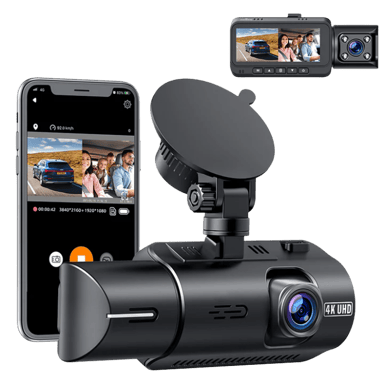
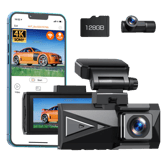
Toguard CE67A is a dual-channel dash cam that records in 4K on the front camera and 1080p inside the cabin for complete front and interior coverage. It includes built-in Wi-Fi and GPS, allowing users to view footage, track driving data, and manage recordings through a mobile app. With infrared night vision, parking monitoring, and wide-angle lenses, it is designed for both daily driving and rideshare use.
Quick Specs Breakdown
The key specs that actually matter—no fluff, no guesswork
Here’s a streamlined view of the Toguard CE67A key specifications. Compare critical features at a glance before exploring the full specs and hands-on insights below.
General Information
Device Type
What type of device is this?
Dash Cam
Camera Configuration
What camera configuration does it use?
Front + Interior
Release Year
What year was it released?
2026
Video & Recording Performance
Interior Camera Resolution
What is the interior camera resolution?
1080p
Interior Frame Rate
What is the interior camera frame rate?
30 Hz
Front Camera Resolution
What is the front camera resolution?
4K
Event Video Length
How long are event recordings?
30-60 seconds
Display & Interface
Display Size
What is the display size?
3.2 inch
Language Support
What languages are supported?
English,Japanese,Chinese
Safety, Security & Parking Protection
G-Sensor
Does it have a G-sensor?
Yes
Parking Mode Impact Detection
Does it detect impacts in parking mode?
Yes
Parking Mode Motion Detection
Does it detect motion while parked?
Yes
Power, Battery & Charging
Power Input Voltage
What input voltage does it require?
5 Volt
USB Connector Type
What USB connector type is used?
Micro-USB
Internal Battery Type
What type of internal battery does it use?
Li-ion
Build, Dimensions & Mounting
Suction Mount
Is a suction mount included?
Yes
Cable Length
How long is the cable?
11 ft
Mount Type
What type of mount is used?
Adhesive
Camera & Lens System
Front Lens Field of View
What is the front lens field of view?
170 degree
Lens Element Count
How many lens elements are used?
6-layer Glass
Lens Type
What type of lens is used?
Glass
Connectivity & Smart Features
Wi-Fi Frequency Band
Which Wi-Fi bands are supported?
2.4GHz
Firmware Update Method
How are firmware updates performed?
App-Based,SD Card
Storage & File Management
Maximum Supported Storage
What is the maximum supported storage?
256 GB
Storage Speed Class Requirement
What storage speed class is required?
Class 10 or U3
File Segmentation Interval
How long is each video segment?
1/3/5 Minutes
Maintenance, Updates & Ownership
Warranty Length
What is the warranty length?
1 Year
Average Lifespan
What is the average lifespan?
3 year
Specifications & Facts 135
Specs measured. Drama avoided.
We put the Toguard CE67A dash cam to the test. Here’s everything: specs, comparisons with other dash cams, pros, cons, and vote-based reactions from real users.
Dash Cam in this range Who knows? (Help us out by suggesting one!)
Defines the duration of automatically saved event recordings.
Don’t keep it to yourself — be the first to react and review the Event Video Length on Toguard CE67A ◉ and help others decide!
Toguard CE67A Video Codec
What video codec is used?
0 Toguard CE67A 0 Votes H.264
Dash Cam in this range Who knows? (Help us out by suggesting one!)
Toguard CE67A
The video codec used is H.264, a widely compatible and efficient compression standard ensuring good video quality at reasonable file sizes.
Defines the compression format used for video files.
Don’t keep it to yourself — be the first to react and review the Video Codec on Toguard CE67A ◉ and help others decide!
Toguard CE67A Loop Recording
Does it support loop recording?
Yes 0Votes Toguard CE67A
Dash Cam in this range Who knows? (Help us out by suggesting one!)
Toguard CE67A
Loop Recording is supported, which automatically overwrites the oldest footage when the memory card is full, enabling continuous recording without manual file management.
Automatically overwrites old footage when storage is full.
Don’t keep it to yourself — be the first to react and review the Loop Recording on Toguard CE67A ◉ and help others decide!
Toguard CE67A Front Frame Rate
What is the front camera frame rate?
30 Hz 0Votes
Dash Cam in this range Who knows? (Help us out by suggesting one!)
Toguard CE67A
The front camera records at a frame rate of 30 Hz, which delivers smooth video playback and detailed motion capture.
Measures how smoothly the front camera records motion.
Don’t keep it to yourself — be the first to react and review the Front Frame Rate on Toguard CE67A ◉ and help others decide!
Toguard CE67A Video Bitrate
What is the video bitrate?
0 Toguard CE67A 0 Votes 20-30 Mbps
Dash Cam in this range Who knows? (Help us out by suggesting one!)
Toguard CE67A
Video bitrate ranges between 20 and 30 Mbps, which controls the quality and size of video files, balancing storage use and image detail.
Describes the data rate used for video encoding quality.
Don’t keep it to yourself — be the first to react and review the Video Bitrate on Toguard CE67A ◉ and help others decide!
Toguard CE67A HDR
Does it support HDR?
Yes 0Votes Toguard CE67A
Dash Cam in this range Who knows? (Help us out by suggesting one!)
Toguard CE67A
HDR (High Dynamic Range) is supported, which helps balance lighting in videos by improving details in both bright and dark areas.
Indicates support for High Dynamic Range video.
Don’t keep it to yourself — be the first to react and review the HDR on Toguard CE67A ◉ and help others decide!
Toguard CE67A WDR
Does it support WDR?
Yes 0Votes Toguard CE67A
Dash Cam in this range Who knows? (Help us out by suggesting one!)
Toguard CE67A
WDR (Wide Dynamic Range) is enabled, improving footage clarity in challenging lighting by balancing bright and dark areas in the video.
Enhances visibility in mixed lighting conditions.
Don’t keep it to yourself — be the first to react and review the WDR on Toguard CE67A ◉ and help others decide!
Toguard CE67A Night Vision Mode
Does it have night vision?
Yes 0Votes Toguard CE67A
Dash Cam in this range Who knows? (Help us out by suggesting one!)
Toguard CE67A
Night Vision Mode ensures the camera can capture footage clearly in low light environments, contributing to safer night driving surveillance.
Enables improved recording in low-light conditions.
Don’t keep it to yourself — be the first to react and review the Night Vision Mode on Toguard CE67A ◉ and help others decide!
Toguard CE67A Infrared Night Vision
Does it support infrared night vision?
Yes 0Votes Toguard CE67A
Dash Cam in this range Who knows? (Help us out by suggesting one!)
Toguard CE67A
Infrared Night Vision is included, enhancing recording quality and visibility in low light or nighttime conditions for safer driving documentation.
Uses infrared LEDs for interior or low-light recording.
Don’t keep it to yourself — be the first to react and review the Infrared Night Vision on Toguard CE67A ◉ and help others decide!
Toguard CE67A Emergency Recording
Is emergency recording supported?
Yes 0Votes Toguard CE67A
Dash Cam in this range Who knows? (Help us out by suggesting one!)
Toguard CE67A
Emergency Recording is active, allowing the dash cam to lock and preserve footage in the event of an impact or sudden incident for later review.
Locks footage during detected incidents.
Don’t keep it to yourself — be the first to react and review the Emergency Recording on Toguard CE67A ◉ and help others decide!
Toguard CE67A Continuous Recording
Can it record continuously?
Yes 0Votes Toguard CE67A
Dash Cam in this range Who knows? (Help us out by suggesting one!)
Toguard CE67A
Continuous Recording mode supports nonstop video capture, automatically managing storage space through loop recording.
Indicates support for uninterrupted recording sessions.
Don’t keep it to yourself — be the first to react and review the Continuous Recording on Toguard CE67A ◉ and help others decide!
Toguard CE67A Dual Recording
Does it support dual recording?
Yes 0Votes Toguard CE67A
Dash Cam in this range Who knows? (Help us out by suggesting one!)
Toguard CE67A
Dual Recording mode means the dash cam can record from two cameras simultaneously, typically front and interior or rear views.
Allows simultaneous front and rear recording.
Don’t keep it to yourself — be the first to react and review the Dual Recording on Toguard CE67A ◉ and help others decide!
Toguard CE67A Time-Lapse Recording
Is time-lapse recording available?
Yes 0Votes Toguard CE67A
Dash Cam in this range Who knows? (Help us out by suggesting one!)
Toguard CE67A
Time-Lapse Recording is supported, allowing the user to record longer periods of footage at accelerated playback speeds, useful for summarizing long drives.
Captures frames at intervals to save storage.
Don’t keep it to yourself — be the first to react and review the Time-Lapse Recording on Toguard CE67A ◉ and help others decide!
Toguard CE67A Parking Recording Mode
Does it record while parked?
Yes 0Votes Toguard CE67A
Dash Cam in this range Who knows? (Help us out by suggesting one!)
Toguard CE67A
Parking Recording Mode is activated, allowing the dash cam to record continuously or upon triggers while the vehicle is parked for added security.
Enables recording while the vehicle is parked.
Don’t keep it to yourself — be the first to react and review the Parking Recording Mode on Toguard CE67A ◉ and help others decide!
Toguard CE67A Audio Recording
Does it record audio?
Yes 0Votes Toguard CE67A
Dash Cam in this range Who knows? (Help us out by suggesting one!)
Toguard CE67A
Audio Recording is enabled, capturing sound along with video, useful for context in events or conversations inside the vehicle.
Captures in-cabin audio alongside video.
Don’t keep it to yourself — be the first to react and review the Audio Recording on Toguard CE67A ◉ and help others decide!
Toguard CE67A Audio Recording Disable Option
Can audio recording be disabled?
Yes 0Votes Toguard CE67A
Dash Cam in this range Who knows? (Help us out by suggesting one!)
Toguard CE67A
Audio Recording Disable Option is available, allowing users to turn off sound recording to comply with privacy requirements or regulations.
Allows users to turn off audio recording.
Don’t keep it to yourself — be the first to react and review the Audio Recording Disable Option on Toguard CE67A ◉ and help others decide!
Toguard CE67A Low-Light Enhancement
Is low-light enhanced?
Yes 0Votes Toguard CE67A
Dash Cam in this range Who knows? (Help us out by suggesting one!)
Improves video clarity in dark environments.
Don’t keep it to yourself — be the first to react and review the Low-Light Enhancement on Toguard CE67A ◉ and help others decide!
Toguard CE67A Triple Channel Recording
Does it support triple recording?
No 0Votes Toguard CE67A
Dash Cam in this range Who knows? (Help us out by suggesting one!)
Supports front, rear, and interior recording together.
Don’t keep it to yourself — be the first to react and review the Triple Channel Recording on Toguard CE67A ◉ and help others decide!
Dash Cam in this range Who knows? (Help us out by suggesting one!)
Specifies the material and construction of the lens.
Don’t keep it to yourself — be the first to react and review the Lens Type on Toguard CE67A ◉ and help others decide!
Toguard CE67A Adjustable Lens Angle
Is the lens angle adjustable?
Yes 0Votes Toguard CE67A
Dash Cam in this range Who knows? (Help us out by suggesting one!)
Toguard CE67A
Adjustable Lens Angle is supported, letting users tilt or pivot the camera lens for optimal field of view and recording angles.
Indicates whether the lens angle can be manually adjusted.
Don’t keep it to yourself — be the first to react and review the Adjustable Lens Angle on Toguard CE67A ◉ and help others decide!
Toguard CE67A Focus Type
What focus type does it use?
0 Toguard CE67A 0 Votes Fixed
Dash Cam in this range Who knows? (Help us out by suggesting one!)
Toguard CE67A
The focus type of the lens is fixed, meaning it is set to a default focal range suitable for typical driving conditions without the need for user adjustment.
Describes how the camera focuses on objects.
Don’t keep it to yourself — be the first to react and review the Focus Type on Toguard CE67A ◉ and help others decide!
Toguard CE67A Distortion Correction
Does it correct lens distortion?
Yes 0Votes Toguard CE67A
Dash Cam in this range Who knows? (Help us out by suggesting one!)
Toguard CE67A
Distortion Correction is supported, helping to reduce the wide-angle lens fisheye effect and produce more natural video images.
Reduces fisheye or edge distortion in wide-angle footage.
Don’t keep it to yourself — be the first to react and review the Distortion Correction on Toguard CE67A ◉ and help others decide!
Toguard CE67A Anti-Glare Coating
Does it have anti-glare coating?
Yes 0Votes Toguard CE67A
Dash Cam in this range Who knows? (Help us out by suggesting one!)
Toguard CE67A
Anti-Glare Coating is applied on the lens or display to reduce reflections and improve visibility under bright lighting conditions.
Minimizes reflections and glare on the lens surface.
Don’t keep it to yourself — be the first to react and review the Anti-Glare Coating on Toguard CE67A ◉ and help others decide!
Toguard CE67A Lens Aperture
What is the lens aperture?
0 Toguard CE67A 0 Votes f/1.8
Dash Cam in this range Who knows? (Help us out by suggesting one!)
Describes the lens opening size affecting low-light performance.
Don’t keep it to yourself — be the first to react and review the Lens Aperture on Toguard CE67A ◉ and help others decide!
Toguard CE67A Polarizing Filter
Does it support a polarizing filter?
No 0Votes Toguard CE67A
Dash Cam in this range Who knows? (Help us out by suggesting one!)
Supports optional CPL filters to reduce reflections.
Don’t keep it to yourself — be the first to react and review the Polarizing Filter on Toguard CE67A ◉ and help others decide!
Toguard CE67A Sensor Type
What sensor type is used?
0 Toguard CE67A 0 Votes CMOS
Dash Cam in this range Who knows? (Help us out by suggesting one!)
Identifies the imaging sensor technology used.
Don’t keep it to yourself — be the first to react and review the Sensor Type on Toguard CE67A ◉ and help others decide!
Toguard CE67A Image Stabilization
Is image stabilization supported?
No 0Votes Toguard CE67A
Dash Cam in this range Who knows? (Help us out by suggesting one!)
Helps reduce shake and vibration in recorded footage.
Don’t keep it to yourself — be the first to react and review the Image Stabilization on Toguard CE67A ◉ and help others decide!
Dash Cam in this range Who knows? (Help us out by suggesting one!)
Toguard CE67A
The dash cam supports multiple languages including English, Japanese, and Chinese, catering to a diverse user base.
Specifies supported system interface languages.
Don’t keep it to yourself — be the first to react and review the Language Support on Toguard CE67A ◉ and help others decide!
Toguard CE67A Built-in Display
Does it have a built-in display?
Yes 0Votes Toguard CE67A
Dash Cam in this range Who knows? (Help us out by suggesting one!)
Toguard CE67A
A Built-in Display is present which allows users to review footage directly on the device, as well as access menus for configuration.
Indicates whether the dash cam includes an integrated screen.
Don’t keep it to yourself — be the first to react and review the Built-in Display on Toguard CE67A ◉ and help others decide!
Toguard CE67A Display Type
What type of display does it use?
0 Toguard CE67A 0 Votes IPS
Dash Cam in this range Who knows? (Help us out by suggesting one!)
Toguard CE67A
The display uses IPS technology, providing better viewing angles and color accuracy compared to standard LCD panels.
Describes the screen technology used.
Don’t keep it to yourself — be the first to react and review the Display Type on Toguard CE67A ◉ and help others decide!
Toguard CE67A Screen Rotation
Does the screen rotate automatically?
Yes 0Votes Toguard CE67A
Dash Cam in this range Who knows? (Help us out by suggesting one!)
Toguard CE67A
Screen Rotation is supported, which means the display orientation can adjust automatically or manually for optimal viewing angles.
Allows the display to rotate based on mounting orientation.
Don’t keep it to yourself — be the first to react and review the Screen Rotation on Toguard CE67A ◉ and help others decide!
Toguard CE67A Screen Auto-Off
Does the screen turn off automatically?
Yes 0Votes Toguard CE67A
Dash Cam in this range Who knows? (Help us out by suggesting one!)
Toguard CE67A
Screen Auto-Off feature enables the display to turn off automatically after a period of inactivity, conserving power and reducing distraction while driving.
Turns off the screen automatically to reduce distraction.
Don’t keep it to yourself — be the first to react and review the Screen Auto-Off on Toguard CE67A ◉ and help others decide!
Toguard CE67A Status LED Indicators
Are status LEDs included?
Yes 0Votes Toguard CE67A
Dash Cam in this range Who knows? (Help us out by suggesting one!)
Toguard CE67A
Status LED Indicators provide visual feedback on the device operating state, assisting users in monitoring system health at a glance.
Uses LED lights to show recording or system status.
Don’t keep it to yourself — be the first to react and review the Status LED Indicators on Toguard CE67A ◉ and help others decide!
Toguard CE67A Physical Control Buttons
Does it have physical buttons?
Yes 0Votes Toguard CE67A
Dash Cam in this range Who knows? (Help us out by suggesting one!)
Toguard CE67A
The device has Physical Control Buttons, providing tactile control which is helpful for quick and precise operation even while driving.
Indicates presence of tactile buttons for control.
Don’t keep it to yourself — be the first to react and review the Physical Control Buttons on Toguard CE67A ◉ and help others decide!
Toguard CE67A Voice Prompt
Are voice prompts supported?
Yes 0Votes Toguard CE67A
Dash Cam in this range Who knows? (Help us out by suggesting one!)
Toguard CE67A
Voice Prompt functionality is included, providing audible feedback to users, which facilitates hands-free operation and status awareness.
Provides spoken alerts and system notifications.
Don’t keep it to yourself — be the first to react and review the Voice Prompt on Toguard CE67A ◉ and help others decide!
Toguard CE67A Touchscreen
Is the display touchscreen-enabled?
No 0Votes Toguard CE67A
Dash Cam in this range Who knows? (Help us out by suggesting one!)
Indicates whether the screen supports touch input.
Don’t keep it to yourself — be the first to react and review the Touchscreen on Toguard CE67A ◉ and help others decide!
Toguard CE67A Voice Control
Does it support voice control?
No 0Votes Toguard CE67A
Dash Cam in this range Who knows? (Help us out by suggesting one!)
Allows hands-free control using voice commands.
Don’t keep it to yourself — be the first to react and review the Voice Control on Toguard CE67A ◉ and help others decide!
Dash Cam in this range Who knows? (Help us out by suggesting one!)
Toguard CE67A
Parking Mode Impact Detection detects impacts or vibrations while the vehicle is parked and triggers the dash cam to record, increasing security post-vehicle shutdown.
Detects impacts while the vehicle is parked.
Don’t keep it to yourself — be the first to react and review the Parking Mode Impact Detection on Toguard CE67A ◉ and help others decide!
Dash Cam in this range Who knows? (Help us out by suggesting one!)
Toguard CE67A
Parking Mode Motion Detection is enabled, allowing the dash cam to detect movement around the vehicle while parked and start recording automatically. This enhances security when the vehicle is unattended.
Triggers recording when motion is detected near the vehicle.
Don’t keep it to yourself — be the first to react and review the Parking Mode Motion Detection on Toguard CE67A ◉ and help others decide!
Toguard CE67A Collision Detection
Does it detect collisions?
Yes 0Votes Toguard CE67A
Dash Cam in this range Who knows? (Help us out by suggesting one!)
Toguard CE67A
Collision Detection is enabled to actively sense impacts and automatically save evidence-critical videos when a collision occurs.
Automatically detects collisions while driving.
Don’t keep it to yourself — be the first to react and review the Collision Detection on Toguard CE67A ◉ and help others decide!
Toguard CE67A File Lock Protection
Are important files protected?
Yes 0Votes Toguard CE67A
Dash Cam in this range Who knows? (Help us out by suggesting one!)
Toguard CE67A
File Lock Protection is included, meaning important video files can be locked to prevent them from being overwritten or deleted automatically. This helps preserve critical footage for later review.
Protects important footage from being overwritten.
Don’t keep it to yourself — be the first to react and review the File Lock Protection on Toguard CE67A ◉ and help others decide!
Toguard CE67A Battery Drain Protection
Is battery drain protection included?
No 0Votes Toguard CE67A
Dash Cam in this range Who knows? (Help us out by suggesting one!)
Prevents excessive vehicle battery drain.
Don’t keep it to yourself — be the first to react and review the Battery Drain Protection on Toguard CE67A ◉ and help others decide!
Toguard CE67A Low-Voltage Cutoff
Does it have low-voltage cutoff?
No 0Votes Toguard CE67A
Dash Cam in this range Who knows? (Help us out by suggesting one!)
Automatically cuts power when voltage drops too low.
Don’t keep it to yourself — be the first to react and review the Low-Voltage Cutoff on Toguard CE67A ◉ and help others decide!
Toguard CE67A Tamper Detection
Does it detect tampering?
No 0Votes Toguard CE67A
Dash Cam in this range Who knows? (Help us out by suggesting one!)
Detects unauthorized handling or movement of the device.
Don’t keep it to yourself — be the first to react and review the Tamper Detection on Toguard CE67A ◉ and help others decide!
Toguard CE67A Encrypted Video Storage
Is video storage encrypted?
No 0Votes Toguard CE67A
Dash Cam in this range Who knows? (Help us out by suggesting one!)
Encrypts stored footage for privacy and security.
Don’t keep it to yourself — be the first to react and review the Encrypted Video Storage on Toguard CE67A ◉ and help others decide!
Toguard CE67A Theft Deterrence Mode
Does it have theft deterrence features?
No 0Votes Toguard CE67A
Dash Cam in this range Who knows? (Help us out by suggesting one!)
Provides features to discourage theft or misuse.
Don’t keep it to yourself — be the first to react and review the Theft Deterrence Mode on Toguard CE67A ◉ and help others decide!
Toguard CE67A Emergency SOS Recording
Does it support emergency SOS recording?
No 0Votes Toguard CE67A
Dash Cam in this range Who knows? (Help us out by suggesting one!)
Automatically records and protects footage during emergencies.
Don’t keep it to yourself — be the first to react and review the Emergency SOS Recording on Toguard CE67A ◉ and help others decide!
Toguard CE67A Driver Fatigue Alert
Does it provide fatigue alerts?
No 0Votes Toguard CE67A
Dash Cam in this range Who knows? (Help us out by suggesting one!)
Alerts the driver when signs of fatigue are detected.
Don’t keep it to yourself — be the first to react and review the Driver Fatigue Alert on Toguard CE67A ◉ and help others decide!
Toguard CE67A Lane Departure Alert
Does it have lane departure alerts?
No 0Votes Toguard CE67A
Dash Cam in this range Who knows? (Help us out by suggesting one!)
Warns the driver if the vehicle drifts from its lane.
Don’t keep it to yourself — be the first to react and review the Lane Departure Alert on Toguard CE67A ◉ and help others decide!
Toguard CE67A Forward Collision Warning
Does it provide forward collision warnings?
No 0Votes Toguard CE67A
Dash Cam in this range Who knows? (Help us out by suggesting one!)
Alerts the driver of potential frontal collisions.
Don’t keep it to yourself — be the first to react and review the Forward Collision Warning on Toguard CE67A ◉ and help others decide!
 Supermod
  Moderator